<?xml version="1.0" encoding="UTF-8"?><feed
	xmlns="http://www.w3.org/2005/Atom"
	xmlns:thr="http://purl.org/syndication/thread/1.0"
	xml:lang="ja"
	>
	<title type="text">とある情シス人の日々雑感</title>
	<subtitle type="text">情報システム人のブログ</subtitle>

	<updated>2023-04-04T07:00:39Z</updated>

	<link rel="alternate" type="text/html" href="https://blog.web-arena.com" />
	<id>https://blog.web-arena.com/feed/atom/</id>
	<link rel="self" type="application/atom+xml" href="https://blog.web-arena.com/feed/atom/" />

	<generator uri="https://wordpress.org/" version="6.8.2">WordPress</generator>
<icon>https://blog.web-arena.com/wp-content/uploads/de30deb96c38320375145c8c4fd36630-144x144.png</icon>
	<link rel='hub' href='https://blog.web-arena.com/?pushpress=hub' />
	<entry>
		<author>
			<name>情シスの人</name>
					</author>

		<title type="html"><![CDATA[自転車に乗れない我が子を乗れるようにする]]></title>
		<link rel="alternate" type="text/html" href="https://blog.web-arena.com/allow_you_to_ride_a_bicycle/?utm_source=rss&#038;utm_medium=rss&#038;utm_campaign=allow_you_to_ride_a_bicycle" />

		<id>https://blog.web-arena.com/?p=1674</id>
		<updated>2023-04-04T07:00:39Z</updated>
		<published>2023-04-04T06:48:24Z</published>
		<category scheme="https://blog.web-arena.com" term="その他" />
		<summary type="html"><![CDATA[情シスとは全く関係ない話。 三輪車で乗り物スタートした我が子ですが、中学入学直前まで成長と共に2回ほど自転車を購入して練習してましたが、小学3～4年の時に挫折。 挫折した理由は明確で、近所に交通公園という名の公園があり、 [&#8230;]]]></summary>

					<content type="html" xml:base="https://blog.web-arena.com/allow_you_to_ride_a_bicycle/?utm_source=rss&#038;utm_medium=rss&#038;utm_campaign=allow_you_to_ride_a_bicycle"><![CDATA[
<p>情シスとは全く関係ない話。</p>
<p>三輪車で乗り物スタートした我が子ですが、中学入学直前まで成長と共に2回ほど自転車を購入して練習してましたが、小学3～4年の時に挫折。</p>
<p>挫折した理由は明確で、近所に交通公園という名の公園があり、そこでは無料貸し出しの自転車を利用し、練習することができます。</p>
<p>小学低学年までは、周りの子供と一緒に練習できるのですが、さすがに中学年位になると、自分より年下の子がすいすい乗れるけど自分は乗れない。挙句他の子から笑われたりしてました。</p>
<p>そんなこんなで、挫折した時から中学直前まで自転車に乗れず、親としてもやる気のないまま自転車を購入しても無駄金になる状態なので、購入をしなかった状態です。</p>
<p><img fetchpriority="high" decoding="async" class="aligncenter size-full wp-image-1680" src="https://blog.web-arena.com/wp-content/uploads/jitensya_rensyu.png" alt="" width="475" height="195" /></p>
<p> </p>
<p> </p>
<h2>さすがに</h2>
<p>中学では行動範囲が広がるわけですし、色々な場所に行って青春してもらいたいわけなので、さすがにこの年齢まで来ると、昨年末から「自転車乗れない状態だと、この先苦労するよ？」と少しずつ圧力を掛けていきました。</p>
<p>最終的には「中学入学前の春休みがラストチャンスかもよ？」などなど。</p>
<p>子供的には聞きたくない話題だと思うけど、この先苦労するのは自分なので、それを他責しないように注意してた。</p>
<h2>んで、今回</h2>
<p>ようやく重い腰を上げれたようなので、「自転車練習しようかな。。。」という声が聞けた。</p>
<p>中学入学前の春休みがラストチャンスの機会に。</p>
<h2>考察</h2>
<p>我が子が自転車に乗れないのはなぜか？と考察。</p>
<p>・乗り物スタートが三輪車だったので、バランス感覚が養えてないのでは？<br />→確かにバランス感覚鈍いな。。。</p>
<p>・基本的な腕力とか脚力が弱い<br />→現代っ子？</p>
<p>・初動の踏み込み時にハンドルがグラグラぶれる<br />→踏み込みに意識が集中しすぎて、ハンドルに意識が回らない？</p>
<h2>自転車選定、そして購入</h2>
<p>まず教える私が軽快車（ママチャリ）のハンドル経験が少ないので、教えられないｗ</p>
<p>個人的にもママチャリのハンドルってバランス取りにくいんじゃね？と勝手に解釈。なのでシティサイクル。</p>
<p>大きさは自転車屋さん曰く、24インチだと小さいとのことで26インチ。</p>
<p>脚力とかが無いので、踏み込み時を楽にするために、外装6段変速をチョイス。</p>
<p>まとめると</p>
<p>シティサイクル、26インチ、外装6段変速の自転車を購入。</p>
<p><img decoding="async" class="aligncenter size-full wp-image-1677" src="https://blog.web-arena.com/wp-content/uploads/building_bicycle2.png" alt="" width="240" height="213" /></p>
<p> </p>
<h2>練習先選定</h2>
<p>さて、自転車買ったので練習先選定。</p>
<p>さすがに交通公園だと恥ずかしいと思うし、貸与自転車以外の走行はダメらしいので、今回は人気が少ない近所の公園を練習場所とした。</p>
<p>この公園は半分は野球練習場、半分は芝生で構成されており、駐車場から野球練習場までは車1台分以上の道があり、芝生側の周囲は幅2m位の道が作られているので練習先としても上々。</p>
<h2>練習1日目</h2>
<p>さて、練習1日目。</p>
<p>まずは自転車にまたがり、足で地面を蹴りながら片道50m位を行ったり来たり。<br />ここでは補助側となる私がサドルの後ろを支えてバランスを取ってあげるようにして、ハンドルを進路方向にすることを説明。</p>
<p>バランスが取れそうだな～？という段階で、次にペダルを踏み込みながら練習。<br />初回からしばらくは、左足で地面を蹴った次に右足でペダルを踏みこむ、ということ何度も何度も伝える。<br />もちろんこの状態でも補助側はサドルの後ろを支えてバランスを取ってあげる。</p>
<p>「ペダル、ペダル、進路方向見て～、ハンドル、ハンドル。おーい、どっちに行こうとしてるの？」ってな感じです。</p>
<p>練習1日目終了。時間にして2時間位。支えながらも10m位走れた。</p>
<p>「昔もこんな感じだったな～、今回は大丈夫かな～？」と思いつつ次回に期待。</p>
<h2>練習2日目</h2>
<p>練習1日目の振り返りで同じことをやりつつ、バランスが取れてないな～と感じたら、ペダルを利用せずに足だけで乗り進んでもらう。慣れたらペダルを利用するという感じ。</p>
<p>練習2日目からは、徐々に支える力を少な目にしていく。</p>
<p>ギア車を選んだので1速にして踏み出しの力が少なくてもペダルが回せるので、ここでギア車の威力を感じる。</p>
<p>段々と支える力を少なくしていくうちに、ほぼサドルを触っているだけの状態で私が自転車の隣で伴走する状態に。</p>
<p>私はマラソン走者ではないので、そんなに連続して走れないのですが、気づいたら私を放置して自走している状態に！</p>
<p>練習2日目終了。今回も2時間位。自走できるようになった。</p>
<h2>勝手にまとめ</h2>
<p>以前までの練習が嘘のように短期間で自走できる状態になった。</p>
<p>思えばキッズ用の自転車って変速ギアなどが装備されている訳でもないし、どれも同じような感じでしたのでキッズ用の自転車も大人と同じような装備があれば良いかな～と思ったり。</p>
<p>でもまぁ、小さい頃から自転車に乗れるようになっておくと、しばらく乗らない時期があっても身体は覚えているので早く乗れるのに越したことはない。</p>
<p>逆に我が子の様に大きくなってから練習したりする場合や、大人になっても乗れない方は今回の様にギア変速付きの自転車を選ぶとペダルの踏み込みが楽なので割と簡単に乗れるようになるのでは？と感じます。</p>
<p>今回の練習で我が子が自転車を倒したのは1回のみ。本来であれば練習で何度も倒れて傷を作りながら覚えていくのだと思うけど、ケガが無い方がいいよね。この先の人生はわからないけど。</p>
<p>私の様に特に苦労もせずに乗れた人からすれば、なんで乗れないかを理解するのが難しかったりするので、乗れない原因を考察してみるとどこかにヒントがあるかもしれません。</p>
<p>あと、幼少期に祖父母などから三輪車をプレゼントしてくれる機会があるかもしれませんが、それは頑なに断って、ペダル無し自転車（ストライダーなど）で経験を積んだ方が良いと思います。</p>
<p> </p>
<p>さて、急制動（急ブレーキ）とかギア変速方法はこれから練習となります。</p>
<p>仮免許一歩手前のような状態なので、車通りの少ない道路などを利用しつつ、事故無く経験を積んで行ってもらいたいです。</p>
<p>自分で乗れた時の笑顔は素敵でしたｗ</p>
<p> </p>


]]></content>
		
					<link rel="replies" type="text/html" href="https://blog.web-arena.com/allow_you_to_ride_a_bicycle/?utm_source=rss&#038;utm_medium=rss&#038;utm_campaign=allow_you_to_ride_a_bicycle#comments" thr:count="0" />
			<link rel="replies" type="application/atom+xml" href="https://blog.web-arena.com/allow_you_to_ride_a_bicycle/feed/atom/" thr:count="0" />
			<thr:total>0</thr:total>
			</entry>
		<entry>
		<author>
			<name>情シスの人</name>
					</author>

		<title type="html"><![CDATA[SoftEther VPNのアップデート]]></title>
		<link rel="alternate" type="text/html" href="https://blog.web-arena.com/softehtervpn-update/?utm_source=rss&#038;utm_medium=rss&#038;utm_campaign=softehtervpn-update" />

		<id>https://blog.web-arena.com/?p=1667</id>
		<updated>2021-08-18T05:06:12Z</updated>
		<published>2021-08-18T05:04:37Z</published>
		<category scheme="https://blog.web-arena.com" term="情シス人の技術的な感じ" /><category scheme="https://blog.web-arena.com" term="SoftEther VPN" /><category scheme="https://blog.web-arena.com" term="VPN" /><category scheme="https://blog.web-arena.com" term="オープンソース" />
		<summary type="html"><![CDATA[2021年08月16日に「SoftEther VPN Project / ソフトイーサ株式会社」より『日本の広範囲のグローバル IP の IPsec VPN 装置宛へのサイバー攻撃の注意喚起と「SoftEther VPN [&#8230;]]]></summary>

					<content type="html" xml:base="https://blog.web-arena.com/softehtervpn-update/?utm_source=rss&#038;utm_medium=rss&#038;utm_campaign=softehtervpn-update"><![CDATA[
<p>2021年08月16日に「SoftEther VPN Project / ソフトイーサ株式会社」より『<a href="https://ja.softether.org/9-about/news/901-210816" target="_blank" rel="noopener">日本の広範囲のグローバル IP の IPsec VPN 装置宛へのサイバー攻撃の注意喚起と「SoftEther VPN」/「PacketiX VPN」への影響を防ぐための設定の確認のお願い・新ビルドのお知らせ</a>』というアナウンスが届きました。</p>
<p>世間のニュースでは「SoftEther VPN」が対象となっておりますが、実際はIPSec VPN装置全般に起こりうる攻撃だそうです。</p>
<p>対処方法としては、以下が推奨されてます<br />・IPsec事前共有鍵(Pre-shared Key)を「vpn」(3文字のデフォルト値) から、8文字以上のある程度複雑な文字列に変更する<br />・アップデートを行う</p>
<p>そこで今回は忘却防止としてSoftEther VPNのアップデート方法を記載します(Linux版です)</p>
<p> </p>
<h2>最新のSoftEther VPNのダウンロード</h2>
<p>以下からダウンロードします</p>
<p><a href="https://www.softether-download.com/ja.aspx?product=softether">https://www.softether-download.com/ja.aspx?product=softether</a></p>
<p>サーバー上ではwgetコマンドだと楽ですね</p>
<pre>wget softether-vpnserver-v4.38-9760-rtm-2021.08.17-linux-x64-64bit.tar.gz</pre>
<h2>展開及びインストール(アップデート)</h2>
<h3>・展開</h3>
<pre>tar zxvfp softether-vpnserver-v4.38-9760-rtm-2021.08.17-linux-x64-64bit.tar.gz</pre>
<h3>・makeからアップデートまで</h3>
<pre>cd vpnserver<br />make<br />vi lang.config<br />en -&gt; ja に変更</pre>
<pre>cp -p /data/vpnserver/vpn_server.config .<br />※現稼働中のconfigファイルをコピー</pre>
<pre>cd /data<br />systemctl stop vpnserver<br />※vpnserver停止(ps axufで停止を確認)</pre>
<pre>mv vpnserver vpnserver.YYYYMMDD<br />※既存ファイルのバックアップ</pre>
<pre>cd (新バージョンのディレクトリ)<br />mv vpnserver /data/</pre>
<pre>systemctl start vpnserver<br />※vpnserver稼働(ps axufで稼働を確認)</pre>
<p> </p>
<p>以上となります。簡単ですね</p>
<p>end</p>
<p> </p>
<p> </p>
]]></content>
		
					<link rel="replies" type="text/html" href="https://blog.web-arena.com/softehtervpn-update/?utm_source=rss&#038;utm_medium=rss&#038;utm_campaign=softehtervpn-update#comments" thr:count="0" />
			<link rel="replies" type="application/atom+xml" href="https://blog.web-arena.com/softehtervpn-update/feed/atom/" thr:count="0" />
			<thr:total>0</thr:total>
			</entry>
		<entry>
		<author>
			<name>情シスの人</name>
					</author>

		<title type="html"><![CDATA[Oktaで行うシングルサインオン(SSO)について]]></title>
		<link rel="alternate" type="text/html" href="https://blog.web-arena.com/about_single_sign-on_at_okta/?utm_source=rss&#038;utm_medium=rss&#038;utm_campaign=about_single_sign-on_at_okta" />

		<id>https://blog.web-arena.com/?p=1641</id>
		<updated>2021-02-05T08:02:06Z</updated>
		<published>2021-02-05T07:59:49Z</published>
		<category scheme="https://blog.web-arena.com" term="情シス人の技術的な感じ" /><category scheme="https://blog.web-arena.com" term="Okta" /><category scheme="https://blog.web-arena.com" term="SSO" />
		<summary type="html"><![CDATA[Oktaと言えば、世界トップクラスのIDaaSとして有名ですね。日本ではOneLoginの方が有名ですが。 現在、Google Workspace(旧G Suite)のアカウントについては、サテライトオフィスのSSOを利 [&#8230;]]]></summary>

					<content type="html" xml:base="https://blog.web-arena.com/about_single_sign-on_at_okta/?utm_source=rss&#038;utm_medium=rss&#038;utm_campaign=about_single_sign-on_at_okta"><![CDATA[
<p>Oktaと言えば、世界トップクラスのIDaaSとして有名ですね。日本ではOneLoginの方が有名ですが。</p>
<p>現在、Google Workspace(旧G Suite)のアカウントについては、<a href="https://www.sateraito.jp/Google_Apps_SSO.html" target="_blank" rel="noopener">サテライトオフィスのSSO</a>を利用してます。<br />サテライトオフィスのSSO環境からOktaに変更しようとしてますが、果たしてOktaでも同様な制御を行えるか試してみました。</p>
<h2>現環境</h2>
<p>・社内ネットワークからは認証のみで利用可能<br />・社外からはPCはアクセスを許可せず、モバイル端末(iPhoneやAndroid)は利用可能<br />　モバイル端末はアクセス申請承認後に利用が可能となる</p>
<h2>んで、設定</h2>
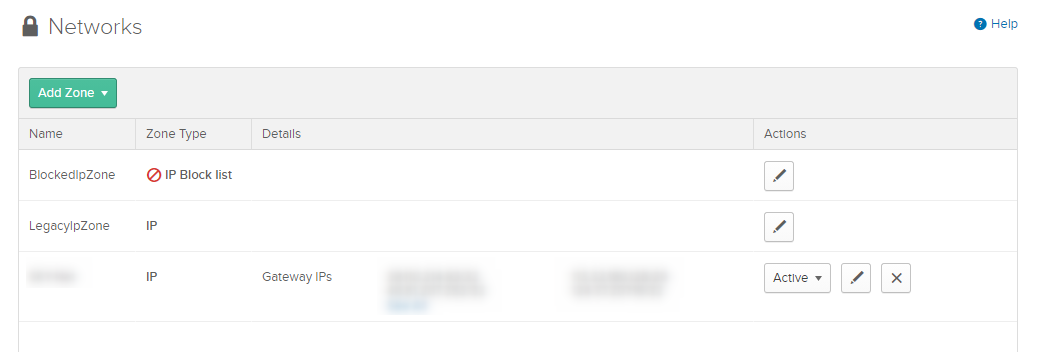
<p>Oktaを調べていると、サインオン時のアクセスポリシーとアプリ毎のアクセスポリシーがあることが分かった。</p>
<p><strong>Security &gt; Networks</strong><br />許可するネットワークを追加</p>
<p><img decoding="async" class="grid aligncenter wp-image-1643 " src="https://blog.web-arena.com/wp-content/uploads/okta_networks.png" alt="" width="519" height="174" srcset="https://blog.web-arena.com/wp-content/uploads/okta_networks.png 1050w, https://blog.web-arena.com/wp-content/uploads/okta_networks-800x268.png 800w, https://blog.web-arena.com/wp-content/uploads/okta_networks-1024x343.png 1024w, https://blog.web-arena.com/wp-content/uploads/okta_networks-768x257.png 768w, https://blog.web-arena.com/wp-content/uploads/okta_networks-530x178.png 530w, https://blog.web-arena.com/wp-content/uploads/okta_networks-565x189.png 565w, https://blog.web-arena.com/wp-content/uploads/okta_networks-710x238.png 710w, https://blog.web-arena.com/wp-content/uploads/okta_networks-725x243.png 725w" sizes="(max-width: 519px) 100vw, 519px" /></p>
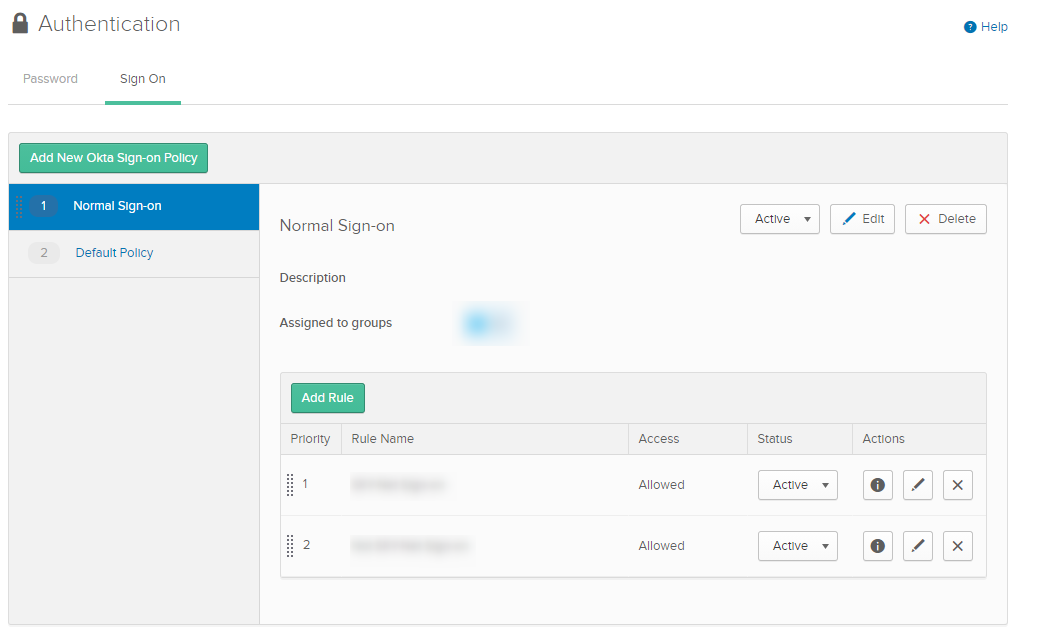
<p><strong>Security &gt; Authentication &gt; Sign On</strong><br />Oktaにサインオン時のポリシーを追加</p>
<p><img loading="lazy" decoding="async" class="grid aligncenter wp-image-1646 " src="https://blog.web-arena.com/wp-content/uploads/okta_auth.png" alt="" width="536" height="326" srcset="https://blog.web-arena.com/wp-content/uploads/okta_auth.png 1050w, https://blog.web-arena.com/wp-content/uploads/okta_auth-800x487.png 800w, https://blog.web-arena.com/wp-content/uploads/okta_auth-1024x623.png 1024w, https://blog.web-arena.com/wp-content/uploads/okta_auth-768x467.png 768w, https://blog.web-arena.com/wp-content/uploads/okta_auth-530x323.png 530w, https://blog.web-arena.com/wp-content/uploads/okta_auth-565x344.png 565w, https://blog.web-arena.com/wp-content/uploads/okta_auth-710x432.png 710w, https://blog.web-arena.com/wp-content/uploads/okta_auth-725x441.png 725w" sizes="auto, (max-width: 536px) 100vw, 536px" /></p>
<p>ここで許可するネットワークからのアクセスはMFAなし、それ以外のネットワークではMAFありとかのポリシーを設定しました</p>
<p> </p>
<p><strong>Applications &gt; アプリ名(例えばG Suite) &gt; Sign On</strong><br />ここでデバイス単位の制御ポリシーを行います。<br />許可ネットワークは<strong>Security &gt; Networks</strong>で指定済みとします。</p>
<p><img loading="lazy" decoding="async" class="grid aligncenter wp-image-1647 " src="https://blog.web-arena.com/wp-content/uploads/okta_apli_auth.png" alt="" width="539" height="693" srcset="https://blog.web-arena.com/wp-content/uploads/okta_apli_auth.png 728w, https://blog.web-arena.com/wp-content/uploads/okta_apli_auth-467x600.png 467w, https://blog.web-arena.com/wp-content/uploads/okta_apli_auth-412x530.png 412w, https://blog.web-arena.com/wp-content/uploads/okta_apli_auth-439x565.png 439w, https://blog.web-arena.com/wp-content/uploads/okta_apli_auth-552x710.png 552w, https://blog.web-arena.com/wp-content/uploads/okta_apli_auth-564x725.png 564w" sizes="auto, (max-width: 539px) 100vw, 539px" /></p>
<p> </p>
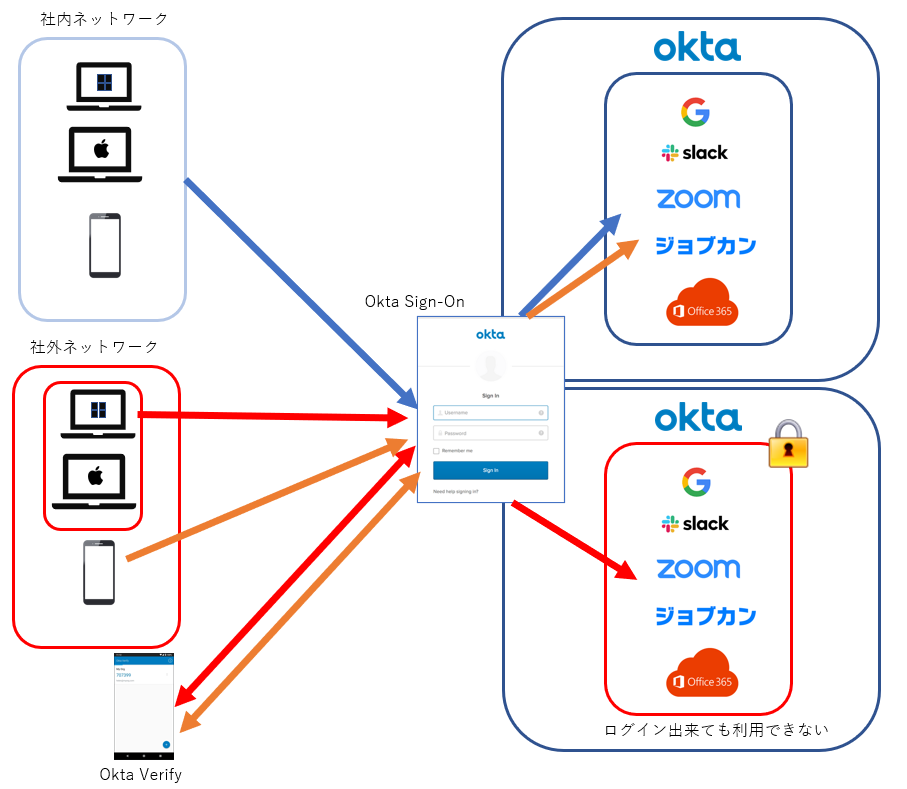
<p>優先度が高い順ですと<br />１．許可されたネットワークからはどのデバイスでも許可<br />２．許可されてないネットワークからのモバイル端末(iPhoneやAndroid)からのアクセスはMFAを利用し、許可<br />　　※MFAはOkta Verifyを利用してます。<br />３．すべてのアクセスを拒否<br />４．すべてのアクセスを許可(デフォルト設定が残っている。これは修正も削除もできない)</p>
<p>図で表すとこんな感じです。</p>
<p><img loading="lazy" decoding="async" class="grid aligncenter wp-image-1650 " src="https://blog.web-arena.com/wp-content/uploads/36ad69f740f95bcf32632986bd15fb7a.png" alt="" width="522" height="454" srcset="https://blog.web-arena.com/wp-content/uploads/36ad69f740f95bcf32632986bd15fb7a.png 907w, https://blog.web-arena.com/wp-content/uploads/36ad69f740f95bcf32632986bd15fb7a-690x600.png 690w, https://blog.web-arena.com/wp-content/uploads/36ad69f740f95bcf32632986bd15fb7a-768x668.png 768w, https://blog.web-arena.com/wp-content/uploads/36ad69f740f95bcf32632986bd15fb7a-530x461.png 530w, https://blog.web-arena.com/wp-content/uploads/36ad69f740f95bcf32632986bd15fb7a-565x491.png 565w, https://blog.web-arena.com/wp-content/uploads/36ad69f740f95bcf32632986bd15fb7a-710x618.png 710w, https://blog.web-arena.com/wp-content/uploads/36ad69f740f95bcf32632986bd15fb7a-725x631.png 725w" sizes="auto, (max-width: 522px) 100vw, 522px" /></p>
<p> </p>
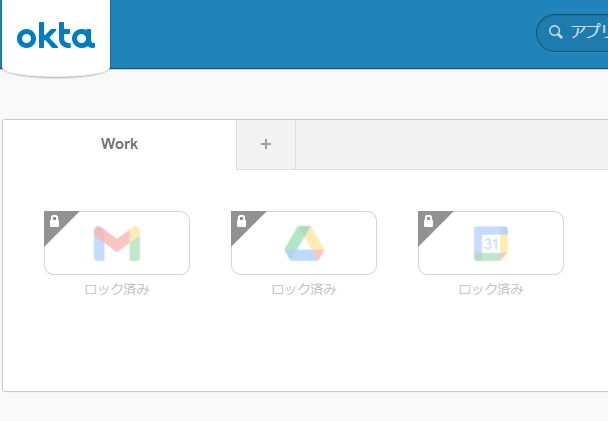
<p>許可されてないとOktaにサインオンしても、アプリがロックされてます</p>
<p><img loading="lazy" decoding="async" class="grid aligncenter wp-image-1652 " src="https://blog.web-arena.com/wp-content/uploads/okta_apli_lock.png" alt="" width="557" height="386" srcset="https://blog.web-arena.com/wp-content/uploads/okta_apli_lock.png 608w, https://blog.web-arena.com/wp-content/uploads/okta_apli_lock-530x367.png 530w, https://blog.web-arena.com/wp-content/uploads/okta_apli_lock-565x391.png 565w" sizes="auto, (max-width: 557px) 100vw, 557px" /></p>
<p> </p>
<p>サテライトオフィスのSSO環境から同様のアクセス制御をOktaで実装しようとしましたが、サインオン時にデバイスの制御ができないっぽいので、このような形に落ち着きそうです。</p>
<p>「こういった方法があるよ！」ってことがありましたらお教えください！</p>
<p> </p>
<p>end</p>
]]></content>
		
					<link rel="replies" type="text/html" href="https://blog.web-arena.com/about_single_sign-on_at_okta/?utm_source=rss&#038;utm_medium=rss&#038;utm_campaign=about_single_sign-on_at_okta#comments" thr:count="0" />
			<link rel="replies" type="application/atom+xml" href="https://blog.web-arena.com/about_single_sign-on_at_okta/feed/atom/" thr:count="0" />
			<thr:total>0</thr:total>
			</entry>
		<entry>
		<author>
			<name>情シスの人</name>
					</author>

		<title type="html"><![CDATA[ユーザーの参加グループをPHPで出力(Google Workspace)]]></title>
		<link rel="alternate" type="text/html" href="https://blog.web-arena.com/output_users_participating_group_in_php/?utm_source=rss&#038;utm_medium=rss&#038;utm_campaign=output_users_participating_group_in_php" />

		<id>https://blog.web-arena.com/?p=1622</id>
		<updated>2021-01-27T02:01:24Z</updated>
		<published>2021-01-27T01:36:46Z</published>
		<category scheme="https://blog.web-arena.com" term="情シス人の技術的な感じ" /><category scheme="https://blog.web-arena.com" term="G Suite" /><category scheme="https://blog.web-arena.com" term="Google Workspace" /><category scheme="https://blog.web-arena.com" term="Google グループ" /><category scheme="https://blog.web-arena.com" term="PHP" /><category scheme="https://blog.web-arena.com" term="情報システム" />
		<summary type="html"><![CDATA[前回はGAS(Google Apps Script)でスプレッドシートに出力しましたが、以下の問題がありました。 ・管理権限者しか実行できない・出力が遅い ですので、今回はAPIを利用して誰でも早く出力することにしました [&#8230;]]]></summary>

					<content type="html" xml:base="https://blog.web-arena.com/output_users_participating_group_in_php/?utm_source=rss&#038;utm_medium=rss&#038;utm_campaign=output_users_participating_group_in_php"><![CDATA[
<p><a href="https://blog.web-arena.com/output_users_participating_group_in_gas/" target="_blank" rel="noopener">前回はGAS(Google Apps Script)でスプレッドシートに出力</a>しましたが、以下の問題がありました。</p>
<p>・管理権限者しか実行できない<br />・出力が遅い</p>
<p>ですので、今回はAPIを利用して誰でも早く出力することにしました。</p>
<h2>前提条件および前準備</h2>
<p><a href="https://developers.google.com/admin-sdk/directory/v1/quickstart/php" target="_blank" rel="noopener">Google Workspace Admin SDK &gt; Directory API</a>にも前提条件として記述されてますが、以下の準備が必要です。</p>
<p>・PHP5.4以上、コマンドライン(CLI)とJSONが利用可能な状態<br />・Composerのインストール<br />・Google WorkspaceドメインへのAPIアクセスの有効化<br />・管理者権限を持つGoogleアカウント</p>
<p>Composerについては、以下のコマンドで作業ディレクトリに設置されます。</p>
<pre># curl -s http://getcomposer.org/installer | php</pre>
<p>設置されたcomposer.pharを使用して、Googleクライアントライブラリをインストールします。</p>
<pre># php composer.phar require google/apiclient:^2.0</pre>
<p>Google Workspace Admin SDK &gt; Directory APIのページにある『quickstart.php』を土台として利用します。</p>
<pre># php quickstart.php</pre>
<p>正常に動作すると『Open the following link in your browser:』が表示されますので、表示されたURLをブラウザを利用してアクセスします。<br />すると認証画面に遷移し、認証を許可するとコードが表示されますのでコピーしてください。<br />表示されたコードをコマンドラインの『Enter Verification code:』の場所に貼り付けます。</p>
<h2>サンプルコードを修正し、Googleグループの登録状況を出力できるようにする</h2>
<p>今回は以下の動作を利用可能としてます</p>
<p>・誰がどのグループ(メーリングリスト)に参加しているかを確認できます。<br />・どのグループ(メーリングリスト)に誰が参加しているかを確認できます。</p>
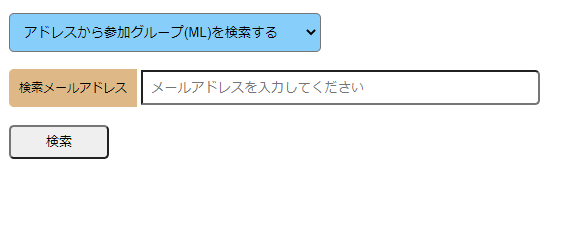
<p>WebUIはこんな感じです</p>
<p><img loading="lazy" decoding="async" class="grid aligncenter wp-image-1623 size-full" src="https://blog.web-arena.com/wp-content/uploads/70dd4ddcfa145f8e34d06f1f659a5382.png" alt="" width="581" height="237" srcset="https://blog.web-arena.com/wp-content/uploads/70dd4ddcfa145f8e34d06f1f659a5382.png 581w, https://blog.web-arena.com/wp-content/uploads/70dd4ddcfa145f8e34d06f1f659a5382-530x216.png 530w, https://blog.web-arena.com/wp-content/uploads/70dd4ddcfa145f8e34d06f1f659a5382-565x230.png 565w" sizes="auto, (max-width: 581px) 100vw, 581px" /></p>
<p>[16行目～]利用するスコープを記述します<br />[22行目]利用するAPIのクライアントIDを、サーバー内に設置し、そのパスとファイル名を記述します<br />[30行目]前準備にて行った認証成功時に指定のファイルが出力されます。利用するスコープを変更するとこのファイルの再作成が必要です<br />[70行目～]Google Workspace利用ドメイン(先頭に@つける)を記述<br />[76行目～]WebUIにて70行目に記述したドメイン以外の入力を受け付けない様にする。<br />[137行目～]個人(プライベート)アドレスなどが入っていた場合、先頭5文字を伏字にする<br /><br /></p>
<pre><pre class="brush: php; title: ; notranslate">
&lt;?php
require __DIR__ . '/vendor/autoload.php';

//if (php_sapi_name() != 'cli') {
//	throw new Exception('This application must be run on the command line.');
//}

/**
 * Returns an authorized API client.
 * @return Google_Client the authorized client object
 */
function getClient()
{
	$client = new Google_Client();
	$client-&gt;setApplicationName('G Suite Directory API PHP Quickstart');
	$client-&gt;setScopes(implode(' ', array(
		'https://www.googleapis.com/auth/admin.directory.group.readonly',
		'https://www.googleapis.com/auth/admin.directory.group.member.readonly',
		'https://www.googleapis.com/auth/admin.directory.user.readonly'
	)));

	$client-&gt;setAuthConfig('OAuth2.0 クライアントIDを記述');
	$client-&gt;setAccessType('offline');
	$client-&gt;setPrompt('select_account consent');

	// Load previously authorized token from a file, if it exists.
	// The file token.json stores the user's access and refresh tokens, and is
	// created automatically when the authorization flow completes for the first
	// time.
	$tokenPath = 'group_token.json';
	if (file_exists($tokenPath)) {
		$accessToken = json_decode(file_get_contents($tokenPath), true);
		$client-&gt;setAccessToken($accessToken);
	}

	// If there is no previous token or it's expired.
	if ($client-&gt;isAccessTokenExpired()) {
		// Refresh the token if possible, else fetch a new one.
		if ($client-&gt;getRefreshToken()) {
			$client-&gt;fetchAccessTokenWithRefreshToken($client-&gt;getRefreshToken());
		} else {
			// Request authorization from the user.
			$authUrl = $client-&gt;createAuthUrl();
			printf("Open the following link in your browser:\n%s\n", $authUrl);
			print 'Enter verification code: ';
			$authCode = trim(fgets(STDIN));

			// Exchange authorization code for an access token.
			$accessToken = $client-&gt;fetchAccessTokenWithAuthCode($authCode);
			$client-&gt;setAccessToken($accessToken);

			// Check to see if there was an error.
			if (array_key_exists('error', $accessToken)) {
				throw new Exception(join(', ', $accessToken));
			}
		}
		// Save the token to a file.
		if (!file_exists(dirname($tokenPath))) {
			mkdir(dirname($tokenPath), 0700, true);
		}
		file_put_contents($tokenPath, json_encode($client-&gt;getAccessToken()));
	}
	return $client;
}


// Get the API client and construct the service object.
$domain = "Google Workspace利用ドメイン(先頭に@つける)";
$eFlag = false; // エラーフラグ
$sFlag = false; // 検索フラグ
$token = ""; // nextPageToken用
$select = $_POST&#x5B;"select"];
$email = $_POST&#x5B;"email"];	
if(strpos($email, $domain) != true){
	$eFlag = true;
}

if(strlen($email) &amp;&amp; strlen($select) &amp;&amp; !$eFlag){

	switch($select) {

		// アドレスから参加グループ(ML)を検索する
		case "1":

			while(!$endFlag){ // 一度に最大200件しか抽出できないので、&#x5B;nextPageToken]が出力している間、繰り返す
				$client = getClient();
				$service = new Google_Service_Directory($client);

				$optParams = array(
				  'userKey' =&gt; $email,
				  'maxResults' =&gt; 200,
				  'pageToken' =&gt; $token
				);

				$group = $service-&gt;groups-&gt;listGroups($optParams);
				for($i = 0; $i &lt; count($group); $i++){
					$ml_arr&#x5B;$i] = $group&#x5B;$i]&#x5B;"email"];
				}


				if($group&#x5B;"nextPageToken"] == null){
					$endFlag = true;
				}else{
					$token = $group&#x5B;"nextPageToken"];
				}
			}


			if(count($ml_arr) &gt;= 1){
				$sFlag = true;
			}else{
				$sFlag = false;
			}			

			$msg = "&lt;span id=\"s_address\"&gt;".$email."&lt;/span&gt;は&lt;span id=\"hit_count\"&gt;".count($ml_arr)."&lt;/span&gt;個のメーリングリストに参加してます\n";

			break;

		// グループ(ML)アドレスから参加者を検索する
		case "2":

			$private_Flag = false;
			while(!$endFlag){ // 一度に最大200件しか抽出できないので、&#x5B;nextPageToken]が出力している間、繰り返す
				$client = getClient();
				$service = new Google_Service_Directory($client);

				$optParams = array(
				  'maxResults' =&gt; 200,
				  'pageToken' =&gt; $token
				);

				$member = $service-&gt;members-&gt;listMembers($email,$optParams);
				for($i = 0; $i &lt; count($member); $i++){
					// Google Workspace利用ドメイン以外は先頭5文字を伏字を入れる
					if(strpos($member&#x5B;$i]&#x5B;"email"], $domain) != true){
						$email_arr = explode("@",$member&#x5B;$i]&#x5B;"email"]);
						$email_arr&#x5B;0] = str_repeat('*',5) . mb_substr($email_arr&#x5B;0],5,mb_strlen($email_arr&#x5B;0], 'UTF8'),'UTF8');
						$ml_arr&#x5B;$i] = $email_arr&#x5B;0]."@".$email_arr&#x5B;1];
						$private_Flag = true;
					}else{	
						$ml_arr&#x5B;$i] = $member&#x5B;$i]&#x5B;"email"];
					}
				}


				if($group&#x5B;"nextPageToken"] == null){
					$endFlag = true;
				}else{
					$token = $member&#x5B;"nextPageToken"];
				}
			}


			if(count($ml_arr) &gt;= 1){
				$sFlag = true;
			}else{
				$sFlag = false;
			}			

			$msg = "&lt;span id=\"s_address\"&gt;".$email."&lt;/span&gt;には&lt;span id=\"hit_count\"&gt;".count($ml_arr)."&lt;/span&gt;個のメールアドレスが参加してます\n";
			if($private_Flag){
				$msg .= "
".$domain."以外は伏字にしております"; // 伏字に対する注釈
			}

			break;


	}	


}else{
	$sFlag = false;
}

?&gt;
</pre></pre>
<p>WebUIはこんな感じ</p>
<pre><pre class="brush: php; title: ; notranslate">
&lt;form action="index.php" method="post"&gt;
&lt;div id="form_select"&gt;
&lt;select name="select"&gt;
&lt;option value="1"&gt;アドレスから参加グループ(ML)を検索する&lt;/option&gt;
&lt;option value="2"&gt;グループ(ML)アドレスから参加者を検索する&lt;/option&gt;
&lt;/select&gt;
&lt;/div&gt;

&lt;span id="form_title"&gt;検索メールアドレス&lt;/span&gt;
&lt;span id="form_data"&gt;&lt;input type="text" size="50" name="email" placeholder="メールアドレスを入力してください"&gt;&lt;/span&gt;

&lt;div id="form_submit"&gt;&lt;input type="submit" value="検索"&gt;&lt;/div&gt;
&lt;/form&gt;

&lt;?php
if($sFlag){
	echo "

\n";
	echo $msg;
	echo "

\n";
	foreach($ml_arr as $key =&gt; $val){
		echo $val."
\n";
	}
	if(count($ml_arr) &gt; 200){
		echo "

\n";
		echo "最大数(200)を超えましたので、これ以上の表示は管理者に伝えてください\n";
	}

}
?&gt;
</pre></pre>
<p>end</p>
]]></content>
		
					<link rel="replies" type="text/html" href="https://blog.web-arena.com/output_users_participating_group_in_php/?utm_source=rss&#038;utm_medium=rss&#038;utm_campaign=output_users_participating_group_in_php#comments" thr:count="0" />
			<link rel="replies" type="application/atom+xml" href="https://blog.web-arena.com/output_users_participating_group_in_php/feed/atom/" thr:count="0" />
			<thr:total>0</thr:total>
			</entry>
		<entry>
		<author>
			<name>情シスの人</name>
					</author>

		<title type="html"><![CDATA[ユーザーの参加グループをGASで出力(Google Workspace)]]></title>
		<link rel="alternate" type="text/html" href="https://blog.web-arena.com/output_users_participating_group_in_gas/?utm_source=rss&#038;utm_medium=rss&#038;utm_campaign=output_users_participating_group_in_gas" />

		<id>https://blog.web-arena.com/?p=1590</id>
		<updated>2021-01-22T02:59:13Z</updated>
		<published>2021-01-22T02:16:27Z</published>
		<category scheme="https://blog.web-arena.com" term="情シス人の技術的な感じ" /><category scheme="https://blog.web-arena.com" term="G Suite" /><category scheme="https://blog.web-arena.com" term="GAS" /><category scheme="https://blog.web-arena.com" term="Google Workspace" /><category scheme="https://blog.web-arena.com" term="Google グループ" /><category scheme="https://blog.web-arena.com" term="情報システム" />
		<summary type="html"><![CDATA[Google Workspace(G Suite)を利用している時に、ユーザーがどのグループ(メーリングリスト)に参加しているか調べると思いますが、Google管理コンソールでは、参加しているグループの一覧表示する場合、 [&#8230;]]]></summary>

					<content type="html" xml:base="https://blog.web-arena.com/output_users_participating_group_in_gas/?utm_source=rss&#038;utm_medium=rss&#038;utm_campaign=output_users_participating_group_in_gas"><![CDATA[
<p>Google Workspace(G Suite)を利用している時に、ユーザーがどのグループ(メーリングリスト)に参加しているか調べると思いますが、Google管理コンソールでは、参加しているグループの一覧表示する場合、最大50件しか表示されない。<br />参加しているグループがそれ以上の場合は、ページ送りして確認するしかありません。(2021年1月現在)<br />また、管理者であってもその一覧をエクスポートすることはできないので、今回GAS(Google Apps Script)を利用してスプレッドシートに出力することにしました。</p>
<h2>スプレッドシートを準備</h2>
<p>スプレッドシートを準備します。<br />今回、C1のセルに検索するユーザーのメールアドレスを記入し、[検索]という画像ボタンを用意して、GASを実行します。<br />A5のセル以下に出力されます。<br />※出力には数分(遅い)掛かります。</p>
<p>また、[クリア]という画像ボタンを用意し、押すことでC1とA5～A500までの値を削除する機能も付けてます。</p>
<p><span style="color: #ff0000;">※操作上便利かな？と思ったので[検索][クリア]ボタンを付けたものを紹介してますが、本来は必要ありません。ですので、必要に応じて準備してください。</span></p>
<p><img loading="lazy" decoding="async" class="aligncenter size-full wp-image-1591" src="https://blog.web-arena.com/wp-content/uploads/e1b001ecce0f130acf41d6755f6df930.png" alt="" width="851" height="283" srcset="https://blog.web-arena.com/wp-content/uploads/e1b001ecce0f130acf41d6755f6df930.png 851w, https://blog.web-arena.com/wp-content/uploads/e1b001ecce0f130acf41d6755f6df930-800x266.png 800w, https://blog.web-arena.com/wp-content/uploads/e1b001ecce0f130acf41d6755f6df930-768x255.png 768w, https://blog.web-arena.com/wp-content/uploads/e1b001ecce0f130acf41d6755f6df930-530x176.png 530w, https://blog.web-arena.com/wp-content/uploads/e1b001ecce0f130acf41d6755f6df930-565x188.png 565w, https://blog.web-arena.com/wp-content/uploads/e1b001ecce0f130acf41d6755f6df930-710x236.png 710w, https://blog.web-arena.com/wp-content/uploads/e1b001ecce0f130acf41d6755f6df930-725x241.png 725w" sizes="auto, (max-width: 851px) 100vw, 851px" /></p>
<p> </p>
<h2>スクリプトエディタの準備</h2>
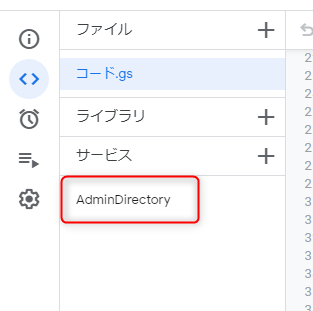
<p>スクリプトエディタでは、サービスとして『AdminDirectory』を追加しております。<br />このことから、<strong><span style="color: #ff0000;">実行は特権管理者のみが行えますので、それ以下の権限の方は実行できません。</span></strong><img loading="lazy" decoding="async" class="size-full wp-image-1592 alignleft" src="https://blog.web-arena.com/wp-content/uploads/4e83732a3e6f1797a5fc7e1a666fbd28.png" alt="" width="313" height="311" srcset="https://blog.web-arena.com/wp-content/uploads/4e83732a3e6f1797a5fc7e1a666fbd28.png 313w, https://blog.web-arena.com/wp-content/uploads/4e83732a3e6f1797a5fc7e1a666fbd28-150x150.png 150w, https://blog.web-arena.com/wp-content/uploads/4e83732a3e6f1797a5fc7e1a666fbd28-75x75.png 75w, https://blog.web-arena.com/wp-content/uploads/4e83732a3e6f1797a5fc7e1a666fbd28-100x100.png 100w, https://blog.web-arena.com/wp-content/uploads/4e83732a3e6f1797a5fc7e1a666fbd28-144x144.png 144w" sizes="auto, (max-width: 313px) 100vw, 313px" /></p>
<p> </p>
<p> </p>
<p> </p>
<p> </p>
<p> </p>
<p> </p>
<p> </p>
<h2>スクリプトについて</h2>
<h3>・rClearの動き</h3>
<p>スプレッドシートの[クリア]ボタンを押すと実行され、C1とA5～A500までの値を削除します。</p>
<h3>・getListMainの動き</h3>
<p><span style="color: #ff0000;">※実行前にdomainの場所に利用中のドメインを記述してください</span></p>
<p>[14行目～]実行時にrClearと同様にA5～A500までの値を削除します。<br />[18行目～]C1のデータを取得します<br />[25行目～]グループ名を取得します。<br />　仕様上の最大200件まで取得します。それ以上にグループが作成されている場合があるので、pageTokenを取得し、次のリストを取得します。<br />[50行目～]pegeTokenが無くなるまで、whileで回し続けます。<br />[36行目～]グループ名を取得したら、その処理の中でC1に記述されたユーザーのメールアドレスを探します。<br />　マッチしたら、グループアドレスを格納します<br />[42行目]グループリストの取得を終えたら、スプレッドシート出力用の関数(values)に格納します<br />[61行目]スプレッドシートにのA5出力します<br />[63行目～]完了メッセージを表示させます。</p>
<h3>スクリプトはこちら</h3>
<pre><pre class="brush: bash; title: ; notranslate">
function rClear() {
	var ss = SpreadsheetApp.getActiveSpreadsheet().getActiveSheet();
	var range1 = ss.getRange("C1");
	var range2 = ss.getRange("A5:A500");
	range1.clearContent();
	range2.clear();
}

function getListMain() {
	let domain = '// ここに利用ドメインを記述'
	let endFlag = false;
	let token = '';

	var ss = SpreadsheetApp.getActiveSpreadsheet().getActiveSheet();
	var range = ss.getRange("A5:A500");
	range.clear();

	var s_member = ss.getRange("C1").getValue();
	var values = &#x5B;];

	// メッセージ用
	var ui = SpreadsheetApp.getUi();
	var msg = "";

	while(!endFlag){
		try {
			var groupList = AdminDirectory.Groups.list({
					domain: domain, //使用しているドメイン
					maxResults: 200, //取得する件数
					pageToken: token
			});
			
			for(var i = 0; i &lt; groupList.groups.length; i++){
				var value = &#x5B;];
				
				var members = AdminDirectory.Members.list(groupList.groups&#x5B;i].email).members;
				if(members){
					for(var j = 0; j &lt; members.length; j++){
						if(s_member == members&#x5B;j].email){
							console.log(groupList.groups&#x5B;i].email);
							value.push(groupList.groups&#x5B;i].email);
							values.push(value);
						}
					}
				}
			}


			if(groupList&#x5B;"nextPageToken"] == null){
				console.log("Group nextPageToken null: "+ groupList&#x5B;"nextPageToken"])
				endFlag = true;
			}else{
				token = groupList&#x5B;"nextPageToken"];
			}

		} catch(error) {
			console.log(error);
		}
	}
	ss.getRange(5, 1,values.length,values&#x5B;0].length).setValues(values);

	msg = "完了しました";
	ui.alert(msg);

	console.log("END")
}
</pre></pre>
<p> </p>
<p>end</p>
<p> </p>
<p> </p>
<p> </p>
<p> </p>
]]></content>
		
					<link rel="replies" type="text/html" href="https://blog.web-arena.com/output_users_participating_group_in_gas/?utm_source=rss&#038;utm_medium=rss&#038;utm_campaign=output_users_participating_group_in_gas#comments" thr:count="0" />
			<link rel="replies" type="application/atom+xml" href="https://blog.web-arena.com/output_users_participating_group_in_gas/feed/atom/" thr:count="0" />
			<thr:total>0</thr:total>
			</entry>
		<entry>
		<author>
			<name>情シスの人</name>
					</author>

		<title type="html"><![CDATA[CentOS8.2にMySQL5.7をインストールする]]></title>
		<link rel="alternate" type="text/html" href="https://blog.web-arena.com/install_mysql5-7_on_centos8-2/?utm_source=rss&#038;utm_medium=rss&#038;utm_campaign=install_mysql5-7_on_centos8-2" />

		<id>https://blog.web-arena.com/?p=1575</id>
		<updated>2020-10-15T06:06:28Z</updated>
		<published>2020-10-15T05:06:42Z</published>
		<category scheme="https://blog.web-arena.com" term="情シス人の技術的な感じ" /><category scheme="https://blog.web-arena.com" term="CentOS" /><category scheme="https://blog.web-arena.com" term="MySQL" />
		<summary type="html"><![CDATA[CentOS8.2にMySQL5.7をインストールしようとしたら、mysql-community-serverが無かったので調べてみたらCentOS7系とは少しやり方が違ったので忘却防止のため記録。 MySQL5.7のリ [&#8230;]]]></summary>

					<content type="html" xml:base="https://blog.web-arena.com/install_mysql5-7_on_centos8-2/?utm_source=rss&#038;utm_medium=rss&#038;utm_campaign=install_mysql5-7_on_centos8-2"><![CDATA[
<p>CentOS8.2にMySQL5.7をインストールしようとしたら、mysql-community-serverが無かったので調べてみたらCentOS7系とは少しやり方が違ったので忘却防止のため記録。</p>
<h2>MySQL5.7のリポジトリの有効化</h2>
<p>RPMファイルをインストールします</p>
<pre><pre class="brush: bash; gutter: false; title: ; notranslate">
# yum localinstall https://dev.mysql.com/get/mysql80-community-release-el7-3.noarch.rpm
</pre></pre>
<p>yum-utilsをインストールします</p>
<pre><pre class="brush: bash; gutter: false; title: ; notranslate">
# yum install yum-utils
MySQL 8.0 Community Server 55 MB/s | 1.3 MB 00:00
MySQL Connectors Community 4.4 MB/s | 79 kB 00:00
MySQL Tools Community 28 MB/s | 476 kB 00:00
Package yum-utils-4.0.12-4.el8_2.noarch is already installed.
Dependencies resolved.
Nothing to do.
Complete!
</pre></pre>
<p>全リポジトリのリストを確認するとデフォルトではmysql80-communityが有効になっているので、これを無効にしてmysql57-communityを有効にします</p>
<pre><pre class="brush: bash; gutter: false; title: ; notranslate">
# yum repolist all
repo id repo name status
AppStream CentOS-8 - AppStream enabled
AppStream-source CentOS-8 - AppStream Sources disabled
BaseOS CentOS-8 - Base enabled
BaseOS-source CentOS-8 - BaseOS Sources disabled
Devel CentOS-8 - Devel WARNING! FOR BUILDROOT USE ONLY! disabled
HighAvailability CentOS-8 - HA disabled
PowerTools CentOS-8 - PowerTools disabled
base-debuginfo CentOS-8 - Debuginfo disabled
c8-media-AppStream CentOS-AppStream-8 - Media disabled
c8-media-BaseOS CentOS-BaseOS-8 - Media disabled
centosplus CentOS-8 - Plus disabled
centosplus-source CentOS-8 - Plus Sources disabled
cr CentOS-8 - cr disabled
extras CentOS-8 - Extras enabled
extras-source CentOS-8 - Extras Sources disabled
fasttrack CentOS-8 - fasttrack disabled
mysql-cluster-7.5-community MySQL Cluster 7.5 Community disabled
mysql-cluster-7.5-community-source MySQL Cluster 7.5 Community - Source disabled
mysql-cluster-7.6-community MySQL Cluster 7.6 Community disabled
mysql-cluster-7.6-community-source MySQL Cluster 7.6 Community - Source disabled
mysql-cluster-8.0-community MySQL Cluster 8.0 Community disabled
mysql-cluster-8.0-community-source MySQL Cluster 8.0 Community - Source disabled
mysql-connectors-community MySQL Connectors Community enabled
mysql-connectors-community-source MySQL Connectors Community - Source disabled
mysql-tools-community MySQL Tools Community enabled
mysql-tools-community-source MySQL Tools Community - Source disabled
mysql-tools-preview MySQL Tools Preview disabled
mysql-tools-preview-source MySQL Tools Preview - Source disabled
mysql55-community MySQL 5.5 Community Server disabled
mysql55-community-source MySQL 5.5 Community Server - Source disabled
mysql56-community MySQL 5.6 Community Server disabled
mysql56-community-source MySQL 5.6 Community Server - Source disabled
mysql57-community MySQL 5.7 Community Server enabled
mysql57-community-source MySQL 5.7 Community Server - Source disabled
mysql80-community MySQL 8.0 Community Server disabled
mysql80-community-source MySQL 8.0 Community Server - Source disabled
openlogic CentOS-8 - openlogic packages for x86_64 enabled
</pre></pre>
<p>mysql80-communityを無効にしてmysql57-communityを有効にします</p>
<pre><pre class="brush: bash; gutter: false; title: ; notranslate">
# yum-config-manager --disable mysql80-community
# yum-config-manager --enable mysql57-community
# yum clean all
</pre></pre>
<p>mysql57-communityが有効になっているか確認します</p>
<pre><pre class="brush: bash; gutter: false; title: ; notranslate">
# yum repolist enabled
repo id repo name
AppStream CentOS-8 - AppStream
BaseOS CentOS-8 - Base
extras CentOS-8 - Extras
mysql-connectors-community MySQL Connectors Community
mysql-tools-community MySQL Tools Community
mysql57-community MySQL 5.7 Community Server
openlogic CentOS-8 - openlogic packages for x86_64
</pre></pre>
<p>mysqlとmariadbのモジュール確認をします</p>
<pre><pre class="brush: bash; gutter: false; title: ; notranslate">
# yum module list mysql mariadb
Last metadata expiration check: 0:05:37 ago on Thu 15 Oct 2020 01:04:34 PM JST.
CentOS-8 - AppStream
Name Stream Profiles Summary
mariadb 10.3 &#x5B;d] client, galera, server &#x5B;d] MariaDB Module
mysql 8.0 &#x5B;d] client, server &#x5B;d] MySQL Module

Hint: &#x5B;d]efault, &#x5B;e]nabled, &#x5B;x]disabled, &#x5B;i]nstalled
</pre></pre>
<p>mysqlとmariadbのモジュール状態を確認してみると[d](default)になってなっているのでmysqlとmariadbモジュールを無効にします</p>
<pre><pre class="brush: bash; gutter: false; title: ; notranslate">
# yum module disable mysql mariadb
Last metadata expiration check: 0:05:50 ago on Thu 15 Oct 2020 01:04:34 PM JST.
Dependencies resolved.
================================================================================================================================================================================================
Package Architecture Version Repository Size
================================================================================================================================================================================================
Disabling modules:
mariadb
mysql

Transaction Summary
================================================================================================================================================================================================

Is this ok &#x5B;y/N]: y
Complete!
</pre></pre>
<p>再度mysqlとmariadbのモジュール確認すると[x](disabled)になっていることを確認します</p>
<pre><pre class="brush: bash; gutter: false; title: ; notranslate">
# yum module list mysql mariadb
Last metadata expiration check: 0:06:01 ago on Thu 15 Oct 2020 01:04:34 PM JST.
CentOS-8 - AppStream
Name Stream Profiles Summary
mariadb 10.3 &#x5B;d]&#x5B;x] client, galera, server &#x5B;d] MariaDB Module
mysql 8.0 &#x5B;d]&#x5B;x] client, server &#x5B;d] MySQL Module

Hint: &#x5B;d]efault, &#x5B;e]nabled, &#x5B;x]disabled, &#x5B;i]nstalled
</pre></pre>
<p>mysql-community-serverの情報を確認してみるとmysql-community-serverも存在し、MySQL5.7が有効になっています</p>
<pre><pre class="brush: bash; gutter: false; title: ; notranslate">
# yum info mysql-community-server
Last metadata expiration check: 0:06:27 ago on Thu 15 Oct 2020 01:04:34 PM JST.
Available Packages
Name : mysql-community-server
Version : 5.7.31
Release : 1.el7
Architecture : x86_64
Size : 173 M
Source : mysql-community-5.7.31-1.el7.src.rpm
Repository : mysql57-community
Summary : A very fast and reliable SQL database server
URL : http://www.mysql.com/
License : Copyright (c) 2000, 2020, Oracle and/or its affiliates. All rights reserved. Under GPLv2 license as shown in the Description field.
Description : The MySQL(TM) software delivers a very fast, multi-threaded, multi-user,
: and robust SQL (Structured Query Language) database server. MySQL Server
: is intended for mission-critical, heavy-load production systems as well
: as for embedding into mass-deployed software. MySQL is a trademark of
: Oracle and/or its affiliates
:
: The MySQL software has Dual Licensing, which means you can use the MySQL
: software free of charge under the GNU General Public License
: (http://www.gnu.org/licenses/). You can also purchase commercial MySQL
: licenses from Oracle and/or its affiliates if you do not wish to be bound by the terms of
: the GPL. See the chapter &quot;Licensing and Support&quot; in the manual for
: further info.
:
: The MySQL web site (http://www.mysql.com/) provides the latest news and
: information about the MySQL software. Also please see the documentation
: and the manual for more information.
:
: This package includes the MySQL server binary as well as related utilities
: to run and administer a MySQL server.
</pre></pre>
<h2>MySQL5.7をインストール</h2>
<p>mysql-community-serverをインストールします</p>
<pre><pre class="brush: bash; gutter: false; title: ; notranslate">
# yum install mysql-community-server
</pre></pre>
<p>MySQL5.7がインストールされているか確認します</p>
<pre><pre class="brush: bash; gutter: false; title: ; notranslate">
# rpm -qa | grep mysql
mysql80-community-release-el7-3.noarch
mysql-community-common-5.7.31-1.el7.x86_64
mysql-community-libs-5.7.31-1.el7.x86_64
mysql-community-client-5.7.31-1.el7.x86_64
mysql-community-server-5.7.31-1.el7.x86_64
</pre></pre>
<p>MySQL5.7の有効化と起動</p>
<pre><pre class="brush: bash; gutter: false; title: ; notranslate">
# systemctl enable mysqld
# systemctl start mysqld
</pre></pre>
<p>初期パスワードを調べます</p>
<pre><pre class="brush: bash; gutter: false; title: ; notranslate">
# grep 'temporary password' /var/log/mysqld.log
2020-10-15T04:55:21.482474Z 1 &#x5B;Note] A temporary password is generated for root@localhost: **********
</pre></pre>
<p>初期設定を行い、パスワードを変更します</p>
<pre><pre class="brush: bash; gutter: false; title: ; notranslate">
# mysql_secure_installation
</pre></pre>
<p>MySQLのバージョンを確認する</p>
<pre><pre class="brush: bash; gutter: false; title: ; notranslate">
# mysql -u root -p -e &quot;select version()&quot;
Enter password:
+-----------+
| version() |
+-----------+
| 5.7.31 |
+-----------+
</pre></pre>
<p>&nbsp;</p>
<p>&nbsp;</p>
<p>end</p>
]]></content>
		
					<link rel="replies" type="text/html" href="https://blog.web-arena.com/install_mysql5-7_on_centos8-2/?utm_source=rss&#038;utm_medium=rss&#038;utm_campaign=install_mysql5-7_on_centos8-2#comments" thr:count="0" />
			<link rel="replies" type="application/atom+xml" href="https://blog.web-arena.com/install_mysql5-7_on_centos8-2/feed/atom/" thr:count="0" />
			<thr:total>0</thr:total>
			</entry>
		<entry>
		<author>
			<name>情シスの人</name>
					</author>

		<title type="html"><![CDATA[WVD(Windows Virtual Desktop)でマスターイメージを利用する]]></title>
		<link rel="alternate" type="text/html" href="https://blog.web-arena.com/using-a-master-image-with-wvdwindowsvirtualdesktop/?utm_source=rss&#038;utm_medium=rss&#038;utm_campaign=using-a-master-image-with-wvdwindowsvirtualdesktop" />

		<id>https://blog.web-arena.com/?p=1567</id>
		<updated>2020-07-13T06:56:13Z</updated>
		<published>2020-07-13T06:56:11Z</published>
		<category scheme="https://blog.web-arena.com" term="情シス人の技術的な感じ" /><category scheme="https://blog.web-arena.com" term="Azure" /><category scheme="https://blog.web-arena.com" term="Windows Virtual Desktop" />
		<summary type="html"><![CDATA[AzureのWindows Virtual Desktop(以下、WVD)はMicrosoftが提供しているDaaSです。これを1台ずつ作成していくというのもありますが、同じ構成のものを配布する場合はマスターイメージを作 [&#8230;]]]></summary>

					<content type="html" xml:base="https://blog.web-arena.com/using-a-master-image-with-wvdwindowsvirtualdesktop/?utm_source=rss&#038;utm_medium=rss&#038;utm_campaign=using-a-master-image-with-wvdwindowsvirtualdesktop"><![CDATA[
<p>AzureのWindows Virtual Desktop(以下、WVD)はMicrosoftが提供しているDaaSです。<br />これを1台ずつ作成していくというのもありますが、同じ構成のものを配布する場合はマスターイメージを作成し、それを利用することで工数が削減できます。</p>
<p>今回はPersonal型を前提にして説明します。</p>
<h2>事前準備</h2>
<ol>
<li>WVDではなく、Virtual MachinesからマスターイメージとなるWindows 10 Enterpriseを1台デプロイする</li>
<li>上記でデプロイしたWindows 10 Enterpriseをマスターイメージ用に設定し、sysprepを行う</li>
<li>sysprepが正常に完了したら、イメージ化を行う</li>
</ol>
<h2>マスターイメージを利用する前の掃除</h2>
<p>マスターイメージを作成した際や、WVDで何らかの作業を行った形跡がある場合、掃除を行っておきます。<br />特に同じテナント名やホストプール名を利用している場合は必要です。</p>
<p>１．AzureADモジュールをインストールし、インポート及びアップデートまで行います<br />※RDSアカウントでログインもします。</p>
<pre>Install-Module AzureAD<br />Import-Module -Name Microsoft.RDInfra.RDPowerShell<br />Update-Module -Name Microsoft.RDInfra.RDPowershell<br />Add-RdsAccount -DeploymentUrl "https://rdbroker.wvd.microsoft.com"</pre>
<p>２．利用するテナント名やホストプール名にゴミが存在しないかチェックします</p>
<pre>Get-RdsSessionHost -TenantName &lt;テナント名&gt; -HostPoolName &lt;ホストプール名&gt; | ft SessionHostName, LastHeartBeat, AllowNewSession, Status</pre>
<p>３．ゴミがあったら掃除します</p>
<pre>Remove-RdsSessionHost -TenantName &lt;テナント名&gt; -HostPoolName &lt;ホストプール名&gt; -SessionHostName &lt;セッションホスト名&gt;<br />Remove-RdsAppGroup &lt;テナント名&gt; &lt;ホストプール名&gt; "Desktop Application Group"<br />Remove-RdsHostPool &lt;テナント名&gt; &lt;ホストプール名&gt;</pre>
<p>４．新しいホストプールを作成します</p>
<pre>New-RdsHostPool -TenantName &lt;テナント名&gt; -HostPoolName &lt;ホストプール名&gt; -Persistent<br /><strong><span style="color: #ff0000;">※Personal型は「-Persistent」を加える</span></strong></pre>
<h2>マスターイメージを利用してWVDを複数台デプロイする</h2>
<p>ここまで行ったら、あとは『Windows Virtual Desktop &#8211; Provision a host pool』からWVDを必要台数デプロイします。<br />Personal型を利用する場合はホストプールを作成する際に、「<span style="color: #ff0000;"><strong>-Persistent</strong></span>」を加えておかないと、デプロイされるWVDがPool型(共有型)として認識されてしまいますので、注意が必要です。</p>
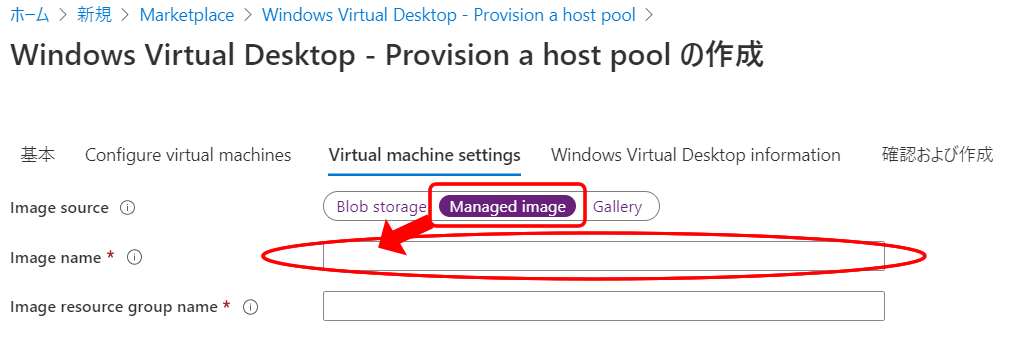
<p>マスターイメージは『Windows Virtual Desktop &#8211; Provision a host pool』のImage Sourceを「<strong>Managed image</strong>」を選択し、Image nameにてイメージ化したファイル名を指定します。</p>
<p><img loading="lazy" decoding="async" class="aligncenter size-full wp-image-1569" src="https://blog.web-arena.com/wp-content/uploads/1182dd44ef07f5080c95e84bebc09847.png" alt="" width="1027" height="344" srcset="https://blog.web-arena.com/wp-content/uploads/1182dd44ef07f5080c95e84bebc09847.png 1027w, https://blog.web-arena.com/wp-content/uploads/1182dd44ef07f5080c95e84bebc09847-800x268.png 800w, https://blog.web-arena.com/wp-content/uploads/1182dd44ef07f5080c95e84bebc09847-1024x343.png 1024w, https://blog.web-arena.com/wp-content/uploads/1182dd44ef07f5080c95e84bebc09847-768x257.png 768w, https://blog.web-arena.com/wp-content/uploads/1182dd44ef07f5080c95e84bebc09847-530x178.png 530w, https://blog.web-arena.com/wp-content/uploads/1182dd44ef07f5080c95e84bebc09847-565x189.png 565w, https://blog.web-arena.com/wp-content/uploads/1182dd44ef07f5080c95e84bebc09847-710x238.png 710w, https://blog.web-arena.com/wp-content/uploads/1182dd44ef07f5080c95e84bebc09847-725x243.png 725w" sizes="auto, (max-width: 1027px) 100vw, 1027px" /></p>
<h2>デプロイしたWVDにユーザーを割り当てる</h2>
<p>利用を許可するユーザー毎にWVDを割り当てます。<br />Personal型の場合、デプロイしたWVD1台に対し、1ユーザーしか割り当ては行えません。また1ユーザーに複数台のWVDを割り当てることもできません。</p>
<p>１．ホストプールの AssignmentType を Direct に変更</p>
<pre>Set-RdsHostPool &lt;テナント名&gt; &lt;ホストプール名&gt; -AssignmentType Direct</pre>
<p>２．ホストプールとセッションホストにユーザーを割り当て</p>
<pre>Add-RdsAppGroupUser &lt;テナント名&gt; &lt;ホストプール名&gt; "Desktop Application Group" -UserPrincipalName &lt;ユーザーのUPNを指定&gt;<br />Set-RdsSessionHost &lt;テナント名&gt; &lt;ホストプール名&gt; -Name &lt;セッションホスト名&gt; -AssignedUser &lt;ユーザーのUPNを指定&gt;</pre>
<p>３．セッションホストの割り当て確認</p>
<pre>Get-RdsSessionHost &lt;テナント名&gt; &lt;ホストプール名&gt;<br />もしくは<br />Get-RdsSessionHost &lt;テナント名&gt; &lt;ホストプール名&gt; -Name &lt;セッションホスト名&gt;</pre>
<p> </p>
<h2>おまけ</h2>
<p>別のセッションホストにユーザーを割り当て(WVD変更)する場合は、同時割当が出来ないので<br />以下のコマンドにて割当を変更する。</p>
<pre># 利用しているセッションホストを削除<br />Remove-RdsSessionHost -TenantName &lt;テナント名&gt; -HostPoolName &lt;ホストプール名&gt; -SessionHostName &lt;セッションホスト名&gt;<br /><br /># 別のセッションホストにユーザーを割り当て<br />Set-RdsSessionHost &lt;テナント名&gt; &lt;ホストプール名&gt; -Name &lt;セッションホスト名&gt; -AssignedUser &lt;ユーザーのUPNを指定&gt;<br />※利用しなくなったWVDをAzure Portalから削除</pre>
<p> </p>
<p> </p>
<p> </p>
<p> </p>
<p> </p>
<p>end</p>
<p> </p>
]]></content>
		
					<link rel="replies" type="text/html" href="https://blog.web-arena.com/using-a-master-image-with-wvdwindowsvirtualdesktop/?utm_source=rss&#038;utm_medium=rss&#038;utm_campaign=using-a-master-image-with-wvdwindowsvirtualdesktop#comments" thr:count="0" />
			<link rel="replies" type="application/atom+xml" href="https://blog.web-arena.com/using-a-master-image-with-wvdwindowsvirtualdesktop/feed/atom/" thr:count="0" />
			<thr:total>0</thr:total>
			</entry>
		<entry>
		<author>
			<name>情シスの人</name>
					</author>

		<title type="html"><![CDATA[Web会議システムについて]]></title>
		<link rel="alternate" type="text/html" href="https://blog.web-arena.com/about-web-conferencing-system/?utm_source=rss&#038;utm_medium=rss&#038;utm_campaign=about-web-conferencing-system" />

		<id>https://blog.web-arena.com/?p=1554</id>
		<updated>2020-04-09T07:27:17Z</updated>
		<published>2020-04-09T06:46:08Z</published>
		<category scheme="https://blog.web-arena.com" term="情シス人の雑記" /><category scheme="https://blog.web-arena.com" term="Hangouts Meet" /><category scheme="https://blog.web-arena.com" term="Microsoft Teams" /><category scheme="https://blog.web-arena.com" term="Web会議" /><category scheme="https://blog.web-arena.com" term="Zoom" /><category scheme="https://blog.web-arena.com" term="ハングアウト" />
		<summary type="html"><![CDATA[新型コロナウィルスの影響で、在宅勤務(テレワーク)を行っている方が多いのではないでしょうか？感染拡大を防ぐためにも「密集・密閉・密接」の3密を避けましょう。 さて、在宅勤務(テレワーク)が盛んになってからWeb会議システ [&#8230;]]]></summary>

					<content type="html" xml:base="https://blog.web-arena.com/about-web-conferencing-system/?utm_source=rss&#038;utm_medium=rss&#038;utm_campaign=about-web-conferencing-system"><![CDATA[
<p>新型コロナウィルスの影響で、在宅勤務(テレワーク)を行っている方が多いのではないでしょうか？<br />感染拡大を防ぐためにも「密集・密閉・密接」の3密を避けましょう。</p>
<p>さて、在宅勤務(テレワーク)が盛んになってからWeb会議システムの需要が伸びてます。<br />世間にはオンプレやSaaSなどで提供されているさまざまなWeb会議システムが存在します。</p>
<p>代表的なのが、こちら。</p>
<ul>
<li><a href="https://zoom.us/" target="_blank" rel="noopener noreferrer">Zoom</a></li>
<li><a href="https://gsuite.google.co.jp/intl/ja/products/meet/" target="_blank" rel="noopener noreferrer">Hangouts Meet</a>(Google Hangout、ハングアウト)</li>
<li><a href="https://products.office.com/ja-jp/microsoft-teams/group-chat-software" target="_blank" rel="noopener noreferrer">Microsoft Teams(Skype)</a></li>
</ul>
<p>私が勤めている会社ではZoomとHangouts Meetを利用してます。<br />共に管理者は私なので、設定などを一通りやってみた感じは、Hangouts Meetの場合はG Suiteの管理画面から機能をオンにするだけです。<br />G Suiteの費用に含まれているので、追加費用は掛かりません。</p>
<p>Zoomに関しては色々設定はありますが、無料枠の基本プランでも40分間・参加者100名までの利用が出来ます。プロプランですと2,000円/月(1ライセンス)掛かりますが、24時間の会議が可能となります。<br />Zoomには会議室用のZoom Roomsもあります。Zoom RoomsはMac端末、iPad、マイク/スピーカーなど揃えると費用が掛かってしまうので、必要であれば揃えるのがいいかな？と思います。</p>
<p><img loading="lazy" decoding="async" class="aligncenter size-full wp-image-1559" src="https://blog.web-arena.com/wp-content/uploads/zoom_plan.png" alt="" width="1340" height="304" srcset="https://blog.web-arena.com/wp-content/uploads/zoom_plan.png 1340w, https://blog.web-arena.com/wp-content/uploads/zoom_plan-800x181.png 800w, https://blog.web-arena.com/wp-content/uploads/zoom_plan-1024x232.png 1024w, https://blog.web-arena.com/wp-content/uploads/zoom_plan-768x174.png 768w, https://blog.web-arena.com/wp-content/uploads/zoom_plan-530x120.png 530w, https://blog.web-arena.com/wp-content/uploads/zoom_plan-565x128.png 565w, https://blog.web-arena.com/wp-content/uploads/zoom_plan-710x161.png 710w, https://blog.web-arena.com/wp-content/uploads/zoom_plan-725x164.png 725w" sizes="auto, (max-width: 1340px) 100vw, 1340px" /></p>
<p>私の会社の場合、Zoomのプロプラン、Zoom Rooms、Zoomの大規模ミーティングを契約してます。</p>
<p>大規模ミーティングはZoomのアドオンという形になりますが、500名(最大1,000名)まで参加できます。<br />在宅勤務(テレワーク)が日常化されている現状では、朝礼や全社会議などで利用しております。</p>
<p>その他、slackでもWeb会議は出来ますが、今回は省きます。</p>
<h2>気になるセキュリティについて</h2>
<p>2020/04/09現在、利用率が高まったZoomで様々な脆弱性が見つかっております。世界から注目されたので、それによって脆弱性が見つかってきたのでしょう。ただし、現在公開されている脆弱性のほとんどは修正されているか、運用でカバー的なものとなっております。<br />例えば、Zoom会議のURLをパスワードを付けずに公開して、見知らぬ方が勝手に参加してくるとか。</p>
<p>まぁ色々な脆弱性はありますが、「Zoomに脆弱性が発見されたから利用したくない」と拒絶するのではなく、Zoomに限った話ではなく、どういった脆弱性なのかリスクアセスメントを実施することが重要なのではないかと思います。</p>
<p>end</p>
]]></content>
		
					<link rel="replies" type="text/html" href="https://blog.web-arena.com/about-web-conferencing-system/?utm_source=rss&#038;utm_medium=rss&#038;utm_campaign=about-web-conferencing-system#comments" thr:count="0" />
			<link rel="replies" type="application/atom+xml" href="https://blog.web-arena.com/about-web-conferencing-system/feed/atom/" thr:count="0" />
			<thr:total>0</thr:total>
			</entry>
		<entry>
		<author>
			<name>情シスの人</name>
					</author>

		<title type="html"><![CDATA[ドラム型洗濯機のフィルタ掃除に歯ブラシは危険]]></title>
		<link rel="alternate" type="text/html" href="https://blog.web-arena.com/toothbrush-is-dangerous-for-cleaning-filter-of-drum-type-washing-machine/?utm_source=rss&#038;utm_medium=rss&#038;utm_campaign=toothbrush-is-dangerous-for-cleaning-filter-of-drum-type-washing-machine" />

		<id>https://blog.web-arena.com/?p=1540</id>
		<updated>2020-03-13T08:53:10Z</updated>
		<published>2020-03-13T08:51:37Z</published>
		<category scheme="https://blog.web-arena.com" term="情シス人の雑記" />
		<summary type="html"><![CDATA[情シスでは無いお話。 ドラム型洗濯機のフィルタ掃除 フィルタ掃除でよく利用されるのが、使い古しの歯ブラシ。これが原因で大変な事が起きた。 何が起きたかと言うと ドラム型洗濯機の上部に乾燥機用のフィルタがあります。そこを歯 [&#8230;]]]></summary>

					<content type="html" xml:base="https://blog.web-arena.com/toothbrush-is-dangerous-for-cleaning-filter-of-drum-type-washing-machine/?utm_source=rss&#038;utm_medium=rss&#038;utm_campaign=toothbrush-is-dangerous-for-cleaning-filter-of-drum-type-washing-machine"><![CDATA[
<p>情シスでは無いお話。</p>
<h2>ドラム型洗濯機のフィルタ掃除</h2>
<p>フィルタ掃除でよく利用されるのが、使い古しの歯ブラシ。<br />これが原因で大変な事が起きた。</p>
<h2>何が起きたかと言うと</h2>
<p>ドラム型洗濯機の上部に乾燥機用のフィルタがあります。<br />そこを歯ブラシで掃除していたら、大きな穴部分(縦配管っぽい部分)にスポーンと落ちた。。。</p>
<p>落ちた場所から歯ブラシの一部が見えたので、割りばしとか菜箸とかで取ろうとしたら、そのまま見えないところまで落ちていった。。。</p>
<h2>こういった事象について</h2>
<p>ネットで色々みたら、今回の事象については多くの人が同じ目にあっているようで、大体はメーカー修理となります。<br />メーカーの修理の方に来てもらうので、出張費がもちろん掛かります。<br />そして内部まで歯ブラシが落ちてしまったので、洗濯機を分解する必要があります。</p>
<p>費用についてはメーカーや対応してくれる人によっては変わってきてしまうのですが、我が家の利用している洗濯機(パナソニック製)については、時間当たり(30分毎)によって費用が加算されていく仕組み。もちろん修理が必要なパーツがあれば、技術料の他にパーツ料金も掛かってきます。</p>
<p>ネットで調べると、大体15,000～50,000円とさまざま。</p>
<h2>修理を依頼する</h2>
<p>パナソニックに電話して、オペレーターに事情を説明する。<br />多い案件なので、すぐに内容を理解してくれました。</p>
<p>だけど、技術者を捕まえるために折り返し連絡するとのこと。<br />この際、大体の費用とか作業時間とか教えてくれる。支払方法(振り込みもしくはカード)も。</p>
<p>幸い午前中に電話したら、午後に来れる技術者が居たので早速きてもらう。</p>
<h2>技術者到着、作業開始</h2>
<p>作業前。間違って動かさないように、昨夜から正面に「使用禁止」と書いておいた。</p>
<p><img loading="lazy" decoding="async" class="aligncenter size-full wp-image-1541" src="https://blog.web-arena.com/wp-content/uploads/1-1.png" alt="" width="310" height="551" srcset="https://blog.web-arena.com/wp-content/uploads/1-1.png 310w, https://blog.web-arena.com/wp-content/uploads/1-1-298x530.png 298w" sizes="auto, (max-width: 310px) 100vw, 310px" /></p>
<p>作業開始。下部を外していってます。</p>
<p><img loading="lazy" decoding="async" class="aligncenter size-full wp-image-1542" src="https://blog.web-arena.com/wp-content/uploads/2-1.png" alt="" width="310" height="551" srcset="https://blog.web-arena.com/wp-content/uploads/2-1.png 310w, https://blog.web-arena.com/wp-content/uploads/2-1-298x530.png 298w" sizes="auto, (max-width: 310px) 100vw, 310px" /></p>
<p>上部と正面を外していきます。ここまでくると素人には難しい。</p>
<p><img loading="lazy" decoding="async" class="aligncenter size-full wp-image-1543" src="https://blog.web-arena.com/wp-content/uploads/3-1.png" alt="" width="310" height="551" srcset="https://blog.web-arena.com/wp-content/uploads/3-1.png 310w, https://blog.web-arena.com/wp-content/uploads/3-1-298x530.png 298w" sizes="auto, (max-width: 310px) 100vw, 310px" /></p>
<p>上部はこんな感じに。</p>
<p><img loading="lazy" decoding="async" class="aligncenter size-full wp-image-1544" src="https://blog.web-arena.com/wp-content/uploads/4-1.png" alt="" width="551" height="310" srcset="https://blog.web-arena.com/wp-content/uploads/4-1.png 551w, https://blog.web-arena.com/wp-content/uploads/4-1-320x180.png 320w, https://blog.web-arena.com/wp-content/uploads/4-1-530x298.png 530w" sizes="auto, (max-width: 551px) 100vw, 551px" /></p>
<p>そして、ドラムの脇に落ちていた歯ブラシを救出。今度は組み立てへ。</p>
<p>作業終了。<br />試運転をして問題が無いかチェック。我が家の場合、排水パイプに埃が溜まっていたので、脱水が正常に行われずになっていたとの事。脱水に2倍位の時間が掛かっていたらしい。</p>
<p>ある程度掃除をして試運転してみると、なんかいつも使っていた時よりも静かになった。<br />まぁ、埃が原因なんでしょうけどｗ</p>
<p><img loading="lazy" decoding="async" class="aligncenter size-full wp-image-1545" src="https://blog.web-arena.com/wp-content/uploads/5-1.png" alt="" width="310" height="551" srcset="https://blog.web-arena.com/wp-content/uploads/5-1.png 310w, https://blog.web-arena.com/wp-content/uploads/5-1-298x530.png 298w" sizes="auto, (max-width: 310px) 100vw, 310px" /></p>
<h2>そして費用は</h2>
<p>11,220円でした。</p>
<p>当初は15,000円位掛ると思ってましたが、予想より安価になったのは良かったけど、歯ブラシ1本で1万円超えは痛いですね。</p>
<p><img loading="lazy" decoding="async" class="aligncenter size-full wp-image-1547" src="https://blog.web-arena.com/wp-content/uploads/6-1.png" alt="" width="310" height="425" /></p>
]]></content>
		
					<link rel="replies" type="text/html" href="https://blog.web-arena.com/toothbrush-is-dangerous-for-cleaning-filter-of-drum-type-washing-machine/?utm_source=rss&#038;utm_medium=rss&#038;utm_campaign=toothbrush-is-dangerous-for-cleaning-filter-of-drum-type-washing-machine#comments" thr:count="0" />
			<link rel="replies" type="application/atom+xml" href="https://blog.web-arena.com/toothbrush-is-dangerous-for-cleaning-filter-of-drum-type-washing-machine/feed/atom/" thr:count="0" />
			<thr:total>0</thr:total>
			</entry>
		<entry>
		<author>
			<name>情シスの人</name>
					</author>

		<title type="html"><![CDATA[Azure Windows Virtual Desktop(WVD) 構築]]></title>
		<link rel="alternate" type="text/html" href="https://blog.web-arena.com/build-azure-windows-virtual-desktop/?utm_source=rss&#038;utm_medium=rss&#038;utm_campaign=build-azure-windows-virtual-desktop" />

		<id>http://blog.web-arena.com/?p=1498</id>
		<updated>2020-03-11T06:09:37Z</updated>
		<published>2020-03-06T06:20:53Z</published>
		<category scheme="https://blog.web-arena.com" term="情シス人の技術的な感じ" /><category scheme="https://blog.web-arena.com" term="Azure" /><category scheme="https://blog.web-arena.com" term="Virtual Desktop" /><category scheme="https://blog.web-arena.com" term="Windows" /><category scheme="https://blog.web-arena.com" term="WVD" />
		<summary type="html"><![CDATA[AzureのWindows Virtual Desktop(以下、WVD)はMicrosoftが提供しているDaaSです。これが2019年に一般公開しましたので、今更ですが構築していきます。今回はFSLogixなどのプロ [&#8230;]]]></summary>

					<content type="html" xml:base="https://blog.web-arena.com/build-azure-windows-virtual-desktop/?utm_source=rss&#038;utm_medium=rss&#038;utm_campaign=build-azure-windows-virtual-desktop"><![CDATA[
<p>AzureのWindows Virtual Desktop(以下、WVD)はMicrosoftが提供しているDaaSです。これが2019年に一般公開しましたので、今更ですが構築していきます。<br>今回はFSLogixなどのプロファイル管理などは省き、単にWVDとしてデプロイ完了まで記述していきます。<br>それでも記事が長くなるので、省略出来る部分はなるべく省いて説明します。</p>
<h3>事前準備</h3>
<p>以下のリソースは前もってご用意してください。</p>
<ul>
<li>Azure AD</li>
<li>Windows Server Active Directory(AD DS)</li>
</ul>
<p>上記ではなく、Azure AD Domain Servicesでも問題無いようですが、今回はAzure ADとAD DSを利用していきます。</p>
<h3>１．Windows Virtual Desktop でテナントを作成する</h3>
<p>WVDを構築する前にテナントを作成する必要があります。<br>テナントを作成開始前に、以下の情報を確認してください</p>
<ul>
<li>Azure Active DirectoryのテナントID</li>
<li>Azure Active Directoryのグローバル管理アカウント</li>
<li>Azure サブスクリプション</li>
</ul>
<p id="tutorial-create-a-tenant-in-windows-virtual-desktop"><span data-ttu-id="12882-103">＞<a href="https://docs.microsoft.com/ja-jp/azure/virtual-desktop/tenant-setup-azure-active-directory" target="_blank" rel="noopener noreferrer">チュートリアル:Windows Virtual Desktop でテナントを作成する</a><br></span></p>
<h3>２．PowerShellを使用してサービス プリンシパルとロールの割り当てを作成する</h3>
<p>RDS Ownerのロールを割り当てたりします。</p>
<p>＞<a href="https://docs.microsoft.com/ja-jp/azure/virtual-desktop/create-service-principal-role-powershell" target="_blank" rel="noopener noreferrer">チュートリアル:PowerShell を使用してサービス プリンシパルとロールの割り当てを作成する</a></p>
<h3>３．Azure Marketplace を使用してホスト プールを作成する</h3>
<p>いよいよWVDを作成します。<br>ここまでPowerShellを利用した端末で、一度でもPowerShellのコマンドウインドウを閉じてしまったら、WVDのPowerShellモジュールをインポートしておいてください。</p>
<p>＞<a href="https://docs.microsoft.com/ja-jp/azure/virtual-desktop/create-host-pools-azure-marketplace" target="_blank" rel="noopener noreferrer">チュートリアル:Azure Marketplace を使用してホスト プールを作成する</a></p>
<p>&nbsp;</p>
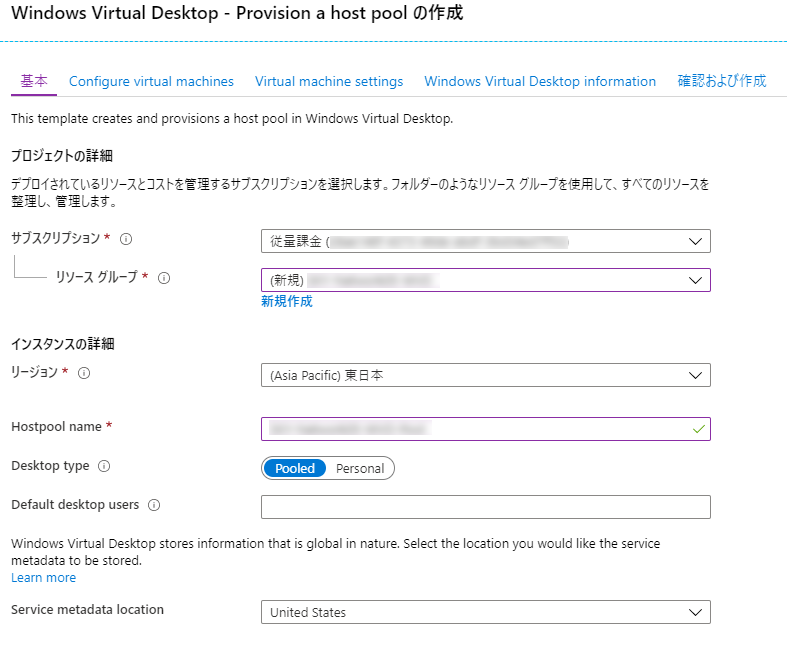
<p>Azure Portalを利用してホストプールのプロビジョニングします。</p>
<p><img loading="lazy" decoding="async" class="aligncenter wp-image-1499 size-full" src="http://blog.web-arena.com/wp-content/uploads/image14.png" alt="" width="787" height="651" srcset="https://blog.web-arena.com/wp-content/uploads/image14.png 787w, https://blog.web-arena.com/wp-content/uploads/image14-725x600.png 725w, https://blog.web-arena.com/wp-content/uploads/image14-768x635.png 768w, https://blog.web-arena.com/wp-content/uploads/image14-660x546.png 660w" sizes="auto, (max-width: 787px) 100vw, 787px" /></p>
<p><strong>・サブスクリプション</strong><br>Azure ADを利用しているサブスクリプションを選択<br><strong>・リソースグループ</strong><br>Virtual Desktopで利用するリソースグループを選択する。無い場合は新規作成する<br><strong>・リージョン</strong><br>Azure ADを利用しているリージョンを選択<br><strong>・Hostpool name</strong><br>ホストプール名を入力<br><strong>・Desktop type</strong><br>プール型で作成するか占有型で作成するか選択(マルチセッションの場合はPool型を利用)<br><strong>・Default desktop users</strong><br>WVDにログインさせるユーザーを入力(後でも追加可能)<br><strong>・Service metadata location</strong><br>2020/03現在はUnited Statesしか選択できない</p>
<p>&nbsp;</p>
<p><img loading="lazy" decoding="async" class="aligncenter size-full wp-image-1500" src="http://blog.web-arena.com/wp-content/uploads/image11.png" alt="" width="775" height="372" srcset="https://blog.web-arena.com/wp-content/uploads/image11.png 775w, https://blog.web-arena.com/wp-content/uploads/image11-768x369.png 768w, https://blog.web-arena.com/wp-content/uploads/image11-660x317.png 660w" sizes="auto, (max-width: 775px) 100vw, 775px" /></p>
<p><strong>・Usage Profile</strong><br>台数の多さとかユーザー数によって変更する<br><strong>・Total users</strong><br>全員で何名利用するか<br><strong>・Virtual machine size</strong><br>スペック。2xとか4xとか表示される(2台分、4台分とか)<br><strong>・Virtual machine name prefix</strong><br>PC名のプレフィックスに何を利用するか。<br>例) prefixという名前の場合、prefix-0、prefix-1</p>
<p>&nbsp;</p>
<p><img loading="lazy" decoding="async" class="aligncenter size-full wp-image-1501" src="http://blog.web-arena.com/wp-content/uploads/image20.png" alt="" width="773" height="658" srcset="https://blog.web-arena.com/wp-content/uploads/image20.png 773w, https://blog.web-arena.com/wp-content/uploads/image20-705x600.png 705w, https://blog.web-arena.com/wp-content/uploads/image20-768x654.png 768w, https://blog.web-arena.com/wp-content/uploads/image20-660x562.png 660w" sizes="auto, (max-width: 773px) 100vw, 773px" /></p>
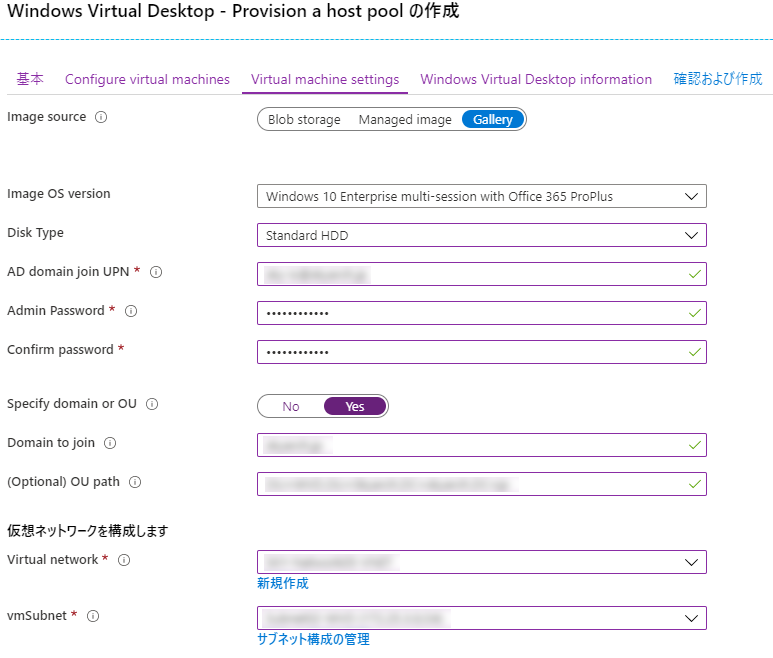
<p><strong>・Image source</strong><br>イメージソースの保存方法<br><strong>・Image OS version</strong><br>利用するOSを選択<br><strong>・Disk Type</strong><br>利用するディスクタイプを選択<br><strong>・AD domain join UPN</strong><br>ADにVMを参加させるアカウントを入力。VMにローカルアカウントとして登録されます<br><strong>・Admin Password / Confirm password</strong><br>上記のパスワード<br><strong>・Specify domain or OU</strong><br>ADのOUに所属させるか<br><strong>・Domain To join</strong><br>どのドメインに所属させるか<br><strong>・(Optional) OU Path</strong><br>どのOUに所属させるか<br><strong>・Virtual Network</strong><br>ADが存在するVNETを選択<br><strong>・vmSubnet</strong><br>WVDを稼働させるSubnetを選択。無ければ作成。</p>
<p><strong><span style="color: #ff0000;">ここで注意点です。</span></strong><br><strong><span style="color: #ff0000;">Virtual NetworkにてAD DSが参照できるDNSサーバーを指定しておかないと、ドメインに所属する際に名前引きが失敗し、デプロイが失敗します。</span></strong></p>
<p>&nbsp;</p>
<p><img loading="lazy" decoding="async" class="aligncenter size-full wp-image-1502" src="http://blog.web-arena.com/wp-content/uploads/image6.png" alt="" width="1018" height="601" srcset="https://blog.web-arena.com/wp-content/uploads/image6.png 1018w, https://blog.web-arena.com/wp-content/uploads/image6-800x472.png 800w, https://blog.web-arena.com/wp-content/uploads/image6-768x453.png 768w, https://blog.web-arena.com/wp-content/uploads/image6-660x390.png 660w" sizes="auto, (max-width: 1018px) 100vw, 1018px" /></p>
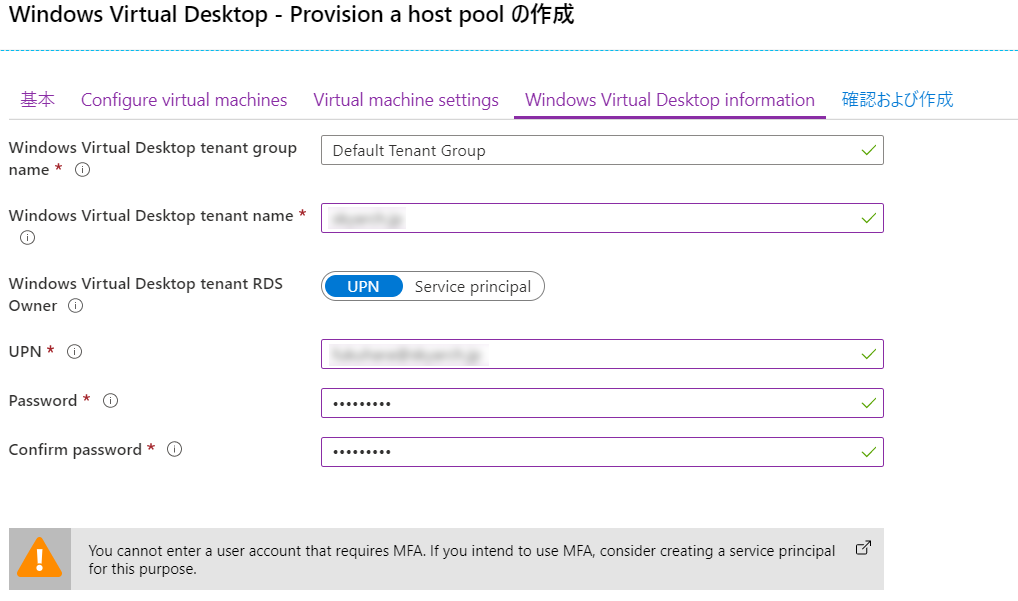
<p><strong>・Windows Virtual Desktop tenant group</strong><br>テナントグループ名を入力。基本的に規定値のまま。<br><strong>・Windows Virtual Desktop tenant name</strong><br>ホストプールが作成先となるテナント名<br><strong>・Windows Virtual Desktop tenant RDS Owner</strong><br>UPNを選択<br><strong>・UPN</strong><br>RDS Ownerのアカウント<br><strong>・Password / Confirm password</strong><br>RDS Ownerのパスワード</p>
<p>&nbsp;</p>
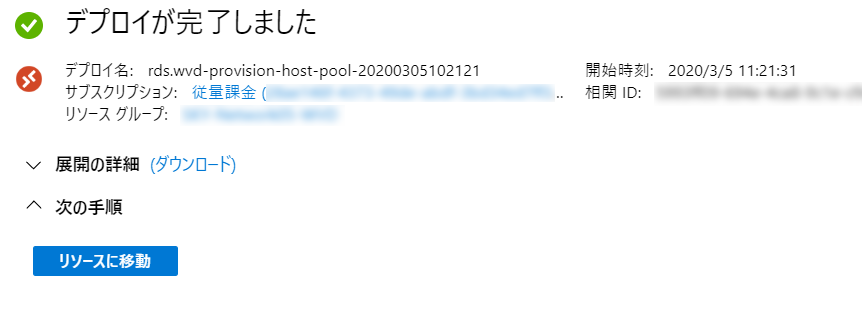
<p>デプロイが成功すると以下の画面になります</p>
<p><img loading="lazy" decoding="async" class="aligncenter size-full wp-image-1503" src="http://blog.web-arena.com/wp-content/uploads/image2.png" alt="" width="862" height="325" srcset="https://blog.web-arena.com/wp-content/uploads/image2.png 862w, https://blog.web-arena.com/wp-content/uploads/image2-800x302.png 800w, https://blog.web-arena.com/wp-content/uploads/image2-768x290.png 768w, https://blog.web-arena.com/wp-content/uploads/image2-660x249.png 660w" sizes="auto, (max-width: 862px) 100vw, 862px" /></p>
<p>&nbsp;</p>
<p>&nbsp;</p>
<p>&nbsp;</p>
<p>&nbsp;</p>
<p>以上です。お疲れさまでした。</p>
]]></content>
		
					<link rel="replies" type="text/html" href="https://blog.web-arena.com/build-azure-windows-virtual-desktop/?utm_source=rss&#038;utm_medium=rss&#038;utm_campaign=build-azure-windows-virtual-desktop#comments" thr:count="0" />
			<link rel="replies" type="application/atom+xml" href="https://blog.web-arena.com/build-azure-windows-virtual-desktop/feed/atom/" thr:count="0" />
			<thr:total>0</thr:total>
			</entry>
	</feed>